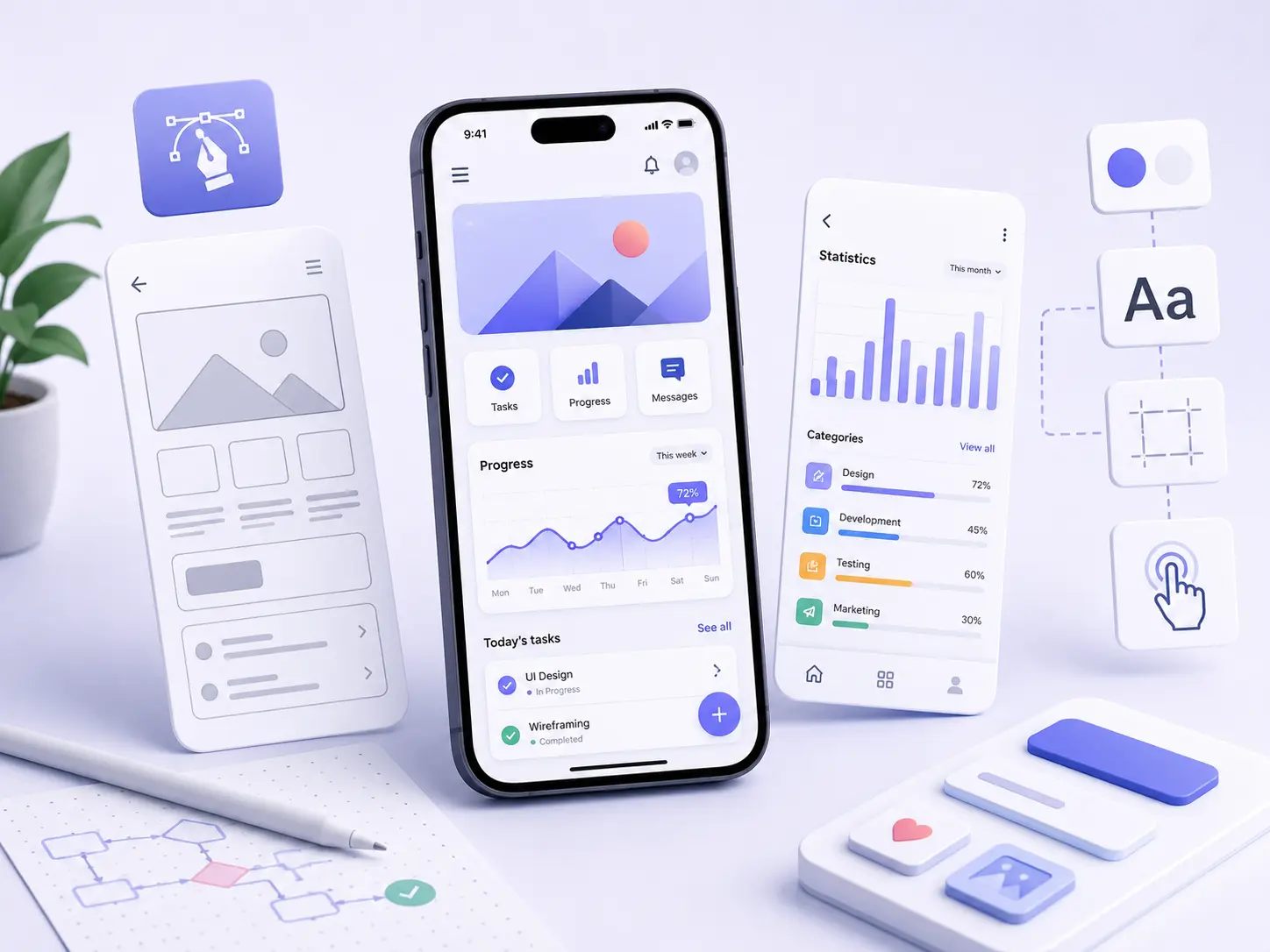
Mobile app design is a structured discipline that aligns User Experience (UX) with User Interface (UI) to deliver mobile applications that are functional, visually appealing and easy to use. It defines how users interact with an application so every screen, action and workflow supports clear user goals.
Mobile app design establishes a consistent visual layer that organizes screens, components, colors, typography, icons and micro-interactions into a cohesive interface. This structure guides attention, communicates hierarchy and helps users complete tasks with confidence.
Mobile app design combines user research, wireframes, prototypes and usability testing into a unified design framework. It refines the user feel through responsive touch targets, consistent spacing, meaningful feedback and familiar platform conventions that support intuitive interactions.
This integrated approach connects user needs, business objectives and technical requirements within mobile app design. The result is a scalable, accessible and reliable mobile application that reflects established UX and UI best practices.
What is mobile app design?
Mobile app design is the systematic process that defines how an application looks and works. It aligns visual appeal with smooth functionality to create mobile experiences that are intuitive, consistent and focused on user goals.
Mobile app design consists of two main parts: User Interface (UI) and User Experience (UX). User Interface (UI) shapes the app looks through layouts, colors, typography and icons, while User Experience (UX) shapes the app works through navigation, interactions and task flows.
Mobile app design connects visual appeal with smooth functionality so every visual element supports a clear purpose. This relationship guides user attention, communicates visual hierarchy and helps users complete tasks efficiently with minimal friction and meaningful feedback.
Why is mobile app design important?
Mobile app design is important because it strengthens user retention, builds brand trust and supports long-term business success. It creates digital experiences that are intuitive, reliable and valuable for both users and organizations.
Mobile app design makes apps easy to use through clear navigation, logical content organization and intuitive interactions. These design decisions help users to navigate the application confidently, complete tasks efficiently and avoid unnecessary confusion or frustration.
Mobile app design boosts revenue as higher engagement encourages users to complete purchases, sign-ups and subscriptions. It also saves money because teams identify usability issues during the wireframe, prototype and testing stages instead of after development.
Mobile app design creates happy customers through consistent, efficient and satisfying user experiences. These positive interactions strengthen user loyalty, increase repeat usage and help applications build long-term relationships with their users.
What are the basics of mobile app design?
The basics of mobile app design are the core principles that help teams create mobile applications with an effective user experience (UX) and a clear user interface (UI). These principles establish a strong foundation for applications that are intuitive, accessible and aligned with user expectations.
The basics of mobile app design begin with a user-centric approach that reflects real user needs, behaviors and goals. User research, personas and journey maps help design decisions support practical tasks and meaningful interactions.
The basics of mobile app design organize content with standard navigation patterns that help users move through the application confidently. Familiar menus, tabs and gestures create predictable interactions and reduce unnecessary confusion.
The basics of mobile app design apply responsive design so layouts, touch targets and content remain consistent across different devices and screen sizes. Regular user feedback from usability tests, analytics and user reviews helps refine the experience, resolve usability issues and improve satisfaction over time.
What are the core principles of mobile app design?
The core principles of mobile app design are the essential guidelines that help mobile interfaces satisfy user needs, direct user attention and create experiences that keep users happy through clear, efficient and accessible interactions.
The 8 core principles of mobile app design are listed below.
- Simplicity: Simplicity removes unnecessary complexity, highlights essential features and helps users complete tasks quickly with minimal confusion.
- Visual Hierarchy: Visual hierarchy uses layout, size, color and spacing to direct user attention toward the most important content and actions on every screen.
- Consistency: Consistency applies familiar design patterns, colors, typography and interaction styles so every screen feels predictable and easy to understand.
- Thumb-Zone Design: Thumb-zone design positions interactive elements and Navigation elements within comfortable reach, reducing unnecessary movement and input errors.
- Responsiveness and Feedback: Responsiveness and feedback ensure the application responds promptly to user actions and provides clear visual feedback that confirms each interaction.
- Minimal Input: Minimal input reduces the amount of information users need to enter through smart defaults, auto-fill options and simplified task flows.
- Accessibility: Accessibility improves readability, touch accuracy and interface clarity through appropriate contrast, text size, labels and touch targets for diverse users.
- User-Centric Navigation: User-centric navigation organizes menus, tabs and navigation paths around user needs, helping users understand their location and move confidently throughout the application.
How does user research improve mobile app design?
User research improves mobile app design because it collects user insights from a defined users group and typical users. These findings identify real user needs, clarify user goals and help designers understand the target audience before design decisions begin.
User research transforms research findings into user personas that support informed design decisions. It also strengthens content hierarchy, reveals usability flaws before development and helps teams create interfaces that reflect real user expectations.
The 6 reasons why user research improves mobile app design are outlined below.
- Finds Frustrations Early: Finds frustrations early when typical users identify usability flaws and pain points during prototype evaluation, allowing issues to be resolved before development.
- Simplifies Navigation: Simplifies navigation because insights from the users group reveal confusing paths and help create clearer menus, labels and task flows that support user goals.
- Builds Empathy: Builds empathy through a deeper understanding of the target audience, helping design decisions reflect real motivations, expectations and everyday challenges.
- Directs New Features: Directs new features because user needs and behavior patterns identify the functionality that delivers the greatest value while reducing unnecessary complexity.
- Sharpens Content Hierarchy: Sharpens content hierarchy by identifying the information users value most, helping important content and actions receive greater visual emphasis.
- Validates Design Decisions: Validates design decisions with continuous user insights that confirm whether screens, interactions and workflows consistently support user goals.
What is the mobile app design process?
The mobile app design process is a user-centered framework that guides teams from problem definition to a user-friendly application. It combines User Experience (UX) design with User Interface (UI) design to create products that satisfy user needs and business objectives.
The mobile app design process validates the value proposition, examines user demographics and identifies ideal users before significant development begins. This structured approach supports product-market fit and helps teams make informed design decisions from the beginning.
The mobile app design process follows industry-standard practices that strengthen design strengths, improve user flows and apply consistent color palettes that reinforce usability and brand identity.
The 9 steps of the mobile app design process are outlined below.
- Define Problem, Goals, and Audience: Problem definition, goal setting and audience identification establish the value proposition, clarify business objectives and identify ideal users before design begins.
- Research and Planning: Research and planning examine user demographics, competitor solutions and usage contexts to define project strategy and scope.
- Information Architecture & User Flows: Information architecture and user flows organize content, navigation and task paths into a logical structure that supports efficient user journeys.
- Wireframing: Wireframing creates low-fidelity layouts that establish page structure, hierarchy and core functionality before visual design.
- Prototyping: Prototyping validates navigation, interactions and design assumptions through realistic user scenarios before development.
- Visual (UI) Design: Visual (UI) design applies color palettes, typography, icons and interface components that create a cohesive, accessible and recognizable product.
- Usability Testing: Usability testing evaluates interface behavior, identifies usability issues and confirms that UX decisions support successful task completion.
- Iterate & Refine: Iteration and refinement improve design quality through user feedback, testing results and continuous optimization of important interactions.
- Developer Handoff: Developer handoff prepares specifications, assets and design system documentation that help engineers build a consistent user-friendly application.
What is mobile app interface design?
Mobile app interface design (UI) is the interactive creation of a mobile application's visual layer. It defines how users see, understand and interact with the interface while making the application visually appealing and easy to use.
Mobile app interface design (UI) uses typography, color schemes and color palettes to establish a consistent brand identity across every screen. These visual elements organize information, guide user attention and reinforce a cohesive interface.
Mobile app interface design (UI) also organizes key components such as buttons, input fields, icons, menus and micro-interactions into a predictable interface. This structured approach supports clear task completion, consistent interaction patterns and a recognizable user experience.
What is mobile app layout design?
Mobile app layout design is the structured organization of the user interface that arranges content, space and interactive elements into a clear visual hierarchy. It helps users understand user information and complete tasks with confidence.
Mobile app layout design defines core elements such as navigation bars, interactive components and dynamic elements to create predictable navigation and accessible interactions. This structure makes important actions easier to find and supports efficient task completion.
Mobile app layout design places interactive controls within comfortable touch areas and applies consistent spacing, alignment and grouping across every screen. These design decisions strengthen usability, improve interface consistency and create a more intuitive mobile experience.
What are the essential elements of mobile app design?
The essential elements of mobile app design are the core principles that create usable interfaces for modern mobile applications. They address mobile-specific constraints while supporting intuitive navigation, visual clarity and efficient user interactions across different devices.
The essential elements of mobile app design organize thumb-friendly UI controls, strengthen information architecture and maintain responsive layouts that adapt to different screen sizes. They also establish aesthetic consistency so every screen feels familiar, predictable and aligned with the product experience.
The essential elements of mobile app design remove non-essential visual elements that distract users from important tasks. This focused approach keeps primary actions within comfortable reach of the user's thumb and improves clarity throughout the interface.
The 8 essential elements of mobile app design are listed below.
- Intuitive Navigation: Intuitive navigation organizes menus, tabs and labels into clear pathways that help users complete tasks with minimal confusion.
- Mobile-Optimized Layouts: Mobile-optimized layouts adapt to different screen sizes while respecting mobile-specific constraints and preserving usability.
- Clear Visual Structure: Clear visual structure uses hierarchy, spacing and grouping to strengthen visual clarity and make information easier to scan.
- Thumb-Friendly UI Controls: Thumb-friendly UI controls position interactive elements within comfortable reach of the user's thumb, improving accuracy and reducing unnecessary effort.
- Interactive Feedback: Interactive feedback confirms user actions through state changes and visual responses that improve confidence during every interaction.
- Platform Consistency: Platform consistency applies familiar iOS and Android design conventions that strengthen aesthetic consistency and create predictable experiences.
- User-Centric Design: User-centric design organizes information architecture and user flows around real user goals, expectations and behaviors.
- Responsive and Adaptive Design: Responsive and adaptive design preserves usability across devices through responsive layouts that adjust content and interface components appropriately.
What are the visual elements of mobile app design?
The visual elements of mobile app design are the essential visual pieces that define how a mobile application looks and communicates with users. They establish brand identity, create a clear visual hierarchy and help users navigate the interface with confidence.
The visual elements of mobile app design include color, typography, layout, icons, imagery and interactive components that support usability and user engagement. Together, these elements reduce visual clutter, emphasize important content and create a cohesive experience across every screen.
The visual elements of mobile app design are listed below.
Color Palette: Color palette establishes brand identity, communicates interface states and directs attention through effective color contrast.
Typography: Typography organizes headings, body text and labels into a readable hierarchy that improves comprehension and visual consistency.
Layout and Grid: Layout and grid arrange interface content into a structured framework that supports logical scanning and predictable navigation.
White Space: White space separates related content, reduces visual clutter and improves focus on important information and actions.
Icons: Icons communicate actions, categories and system status through recognizable visual symbols that reduce dependence on text.
Imagery and Graphics: Imagery and graphics strengthen communication, reinforce brand personality and provide meaningful visual context where appropriate.
UI Controls: UI controls present buttons, input fields, toggles and cards that encourage interaction and communicate interface states clearly.
What are the interactive elements of mobile app design?
The interactive elements of mobile app design are the building blocks and dynamic components that allow users to interact with a mobile application. They translate user intent into meaningful actions through touch, gestures and interface controls that support efficient task completion.
The interactive elements of mobile app design include buttons, text inputs, navigation controls, selection widgets and swipeable gestures. These interactive components help users enter input data, change settings, navigate between screens and complete both simple and complex tasks with confidence.
The interactive elements of mobile app design respond consistently to user actions and communicate clear system feedback. This structured interaction model improves usability, strengthens user confidence and creates a more intuitive mobile experience.
The interactive elements of mobile app design are listed below.
Buttons & CTAs: Buttons and CTAs trigger actions such as submitting forms, confirming selections and opening new screens.
Input Fields & Forms: Input fields and forms collect input data including names, email addresses, passwords and search queries.
Navigation Components: Navigation components organize menus, tab bars and navigation drawers that help users move confidently throughout the application.
Selection Controls: Selection controls include checkboxes, radio buttons, switches and dropdown lists that help users choose options and manage settings.
Sliders & Steppers: Sliders and steppers adjust values such as volume, brightness, quantity and pricing with precise user control.
Tapping/Clicking: Tapping and clicking activate buttons, links, cards and other touchable interface elements through direct interaction.
Swiping: Swiping uses swipeable gestures to scroll content, switch pages and dismiss interface elements efficiently.
Pinching and Zooming: Pinching and zooming adjust the viewing scale of images, maps and detailed content for better visibility.
Pull-to-Refresh: Pull-to-refresh reloads lists and content feeds so users can access the latest available information.
How does responsive design improve mobile apps?
Responsive design improves mobile apps that ensures layouts adapt to different screen sizes and device orientations. This approach keeps content, navigation and touch targets clear, accessible and consistent across a wide range of mobile devices.
Responsive design creates a touch-friendly interface that reduces accidental taps and minimizes user frustration. It also helps a broader user base interact comfortably with applications across different phones and tablets.
Responsive design applies flexible grids, scalable typography and well-defined breakpoints to maintain readability, interface stability and performance. These design decisions improve engagement, encourage repeat use and deliver a consistent mobile experience across changing screen conditions.
What are the best practices for mobile app design?
The best practices for mobile app design are the proven guidelines that shape user interfaces and interactive elements. They match user expectations, deliver consistent user experiences and establish a clear visual hierarchy across different mobile devices.
The best practices for mobile app design prioritize touch-friendly interactions, clear Call-to-Actions (CTAs), intuitive top-level navigation and focused screen layouts. They also emphasize visual simplicity, eliminate unnecessary interface elements and create predictable interaction patterns that help users complete tasks confidently.
The best practices for mobile app design strengthen accessibility, performance and onboarding so applications feel responsive, inclusive and easy to understand from the first launch.
The 10 best practices for mobile app design are outlined below.
- Gather Demographic Data: Demographic data helps teams understand who uses the application, which devices they prefer and the contexts in which they interact with the product.
- Thumb-Friendly Layouts: Thumb-friendly layouts position primary actions and important interface controls within comfortable reach for one-handed use.
- Platform Consistency: Platform consistency follows established iOS and Android conventions so interface patterns, icons and gestures feel familiar and predictable.
- Simplified Onboarding & Registration: Simplified onboarding and registration reduce unnecessary steps, support convenient sign-in methods and help users begin quickly.
- Performance & Load Speed: Performance and load speed keep applications responsive through optimized resources, efficient loading and clear progress indicators.
- Performance & Load Speed: Performance and load speed keep applications responsive through optimized resources, efficient loading and clear progress indicators.
- Clear Visual Hierarchy: Clear visual hierarchy organizes headings, content groups and Call-to-Actions (CTAs) with appropriate size, spacing and color emphasis.
- Reduced Clutter: Reduced clutter removes unnecessary interface elements so users focus on primary tasks and important content without distraction.
- Intuitive Navigation: Intuitive navigation organizes top-level navigation with clear labels and logical pathways that help users move confidently throughout the application.
- Touch-Friendly Interactions: Touch-friendly interactions provide appropriately sized touch targets, responsive feedback and comfortable spacing that support accurate user input.
What is a mobile app design system?
A mobile app design system is a structured collection of mobile-friendly building blocks and reusable components that helps teams create consistent user interfaces and a cohesive user experience. It establishes shared design standards that improve scalability, collaboration and interface consistency across mobile applications.
A mobile app design system defines typography, color palettes, spacing and component behavior so every screen and user flow follows the same visual and interaction standards. This unified approach creates recognizable interfaces that remain consistent across platforms.
Mobile app design system also includes documentation, design tokens and version-controlled component libraries that serve as a shared source of truth for designers and developers. These resources support consistent implementation of buttons, forms, navigation and interface patterns throughout the product.
What are wireframes in mobile app design?
Wireframes in mobile app design are skeletal, two-dimensional blueprints that define the structure, functionality and user experience of an application before visual aesthetics are introduced. They establish the foundation for interface planning and early design decisions.
Wireframes in mobile app design use grayscale tones and placeholders to organize content hierarchy, clarify navigation flow and represent important interface areas without visual distractions. This simplified structure keeps attention on usability and application flow.
Wireframes in mobile app design include core components such as layout boxes, text blocks, buttons, menus and image placeholders. These elements help teams evaluate interface structure, confirm functionality and improve the user experience before detailed visual design begins.
What are the latest mobile app design trends?
The latest mobile app design trends are modern design approaches that use AI-native interfaces, spatial design and adaptive layouts to personalize screens and respond to real-time data. These trends create mobile experiences that feel more intuitive, responsive and relevant to individual users.
The latest mobile app design trends introduce 3D elements, layered hierarchies, thumb-friendly swipe interactions, voice-powered controls and purposeful micro-interactions that improve usability without increasing interface complexity.
The 7 latest mobile app design trends are listed below.
- Predictive AI UI: Predictive AI UI uses AI-native interfaces to analyze user behavior, personalize screens and adapt interface layouts according to real-time data.
- Spatial Depth & Glassmorphism: Spatial depth and glassmorphism combine translucent layers, blur effects and 3D elements to create layered hierarchies that improve visual focus and interface clarity.
- Zero-Click Navigation & Gestures: Zero-click navigation and gestures use thumb-friendly swipe patterns, edge actions and smooth transitions that reduce effort and support efficient one-handed interaction.
- Advanced Dark Mode: Advanced dark mode adapts themes and contrast levels to user preferences and device settings for a more comfortable viewing experience.
- Sustainable and Ethical UX: Sustainable and ethical UX prioritizes accessibility, privacy, reduced distraction and efficient performance to create responsible user experiences.
- Seamless Biometrics & Multimodal Input: Seamless biometrics and multimodal input combine passwordless authentication, voice-powered interactions and touch input that simplify secure access and task completion.
- Purposeful Micro-Interactions: Purposeful micro-interactions provide visual, motion and haptic feedback that confirms actions, communicates system status and improves interface responsiveness.
What tools and resources are commonly used for mobile app design?
The tools and resources commonly used for mobile app design are industry-standard UI/UX editors, AI-powered design generators and real-world reference libraries that help teams create high-quality mobile interfaces. They support interface design, component building, interactive prototyping and consistent design workflows throughout the product lifecycle.
The tools and resources commonly used for mobile app design help teams generate design assets, produce high-fidelity wireframing and validate interactive prototypes before development. These solutions improve collaboration, strengthen design consistency and accelerate product delivery.
The tools and resources commonly used for mobile app design are listed below.
Figma: Figma is an industry-standard UI/UX editor that supports interface design, component building and interactive prototyping through collaborative workflows.
Sketch: Sketch is a vector-based design tool that specializes in high-fidelity wireframing and screen design for macOS.
Axure RP: Axure RP creates advanced wireframes and interactive prototypes with conditional logic and dynamic behaviors.
Marvel: Marvel transforms static interface designs into interactive prototypes that support design reviews and user validation.
Uizard: Uizard is an AI-powered design generator that converts sketches and text prompts into mobile interface designs and templates.
Sleek: Sleek is an AI-powered design generator that helps teams generate design assets and mobile interface layouts efficiently.
Adobe XD: Adobe XD supports interface design, wireframes and interactive prototyping with animation and collaboration features.
Balsamiq: Balsamiq creates low-fidelity wireframes that help teams evaluate layout structure before visual design begins.
Canva: Canva creates interface mockups, brand assets and supporting marketing visuals for mobile applications.
Fluid UI: Fluid UI provides collaborative interface design and interactive prototyping with real-time team collaboration.
Framer: Framer combines visual interface design with code-based components for advanced interactive prototypes.
Justinmind: Justinmind develops wireframes and interactive prototypes with extensive widget libraries and realistic interactions.
Miro: Miro supports wireframes, user flow mapping and collaborative planning within shared digital workspaces.
Mockplus: Mockplus creates interactive mobile app mockups and interface prototypes through a streamlined design workflow.
UXPin: UXPin develops high-fidelity wireframes and interactive prototypes with reusable code-based components.
Apple Human Interface Guidelines: Apple Human Interface Guidelines provide a real-world reference library that defines interface standards, patterns and best practices for iOS applications.
Google Material Design: Google Material Design provides a design system and real-world reference library for Android interface standards, components and design patterns.
Mobbin: Mobbin provides a real-world reference library of mobile application screens that support design inspiration, interface analysis and pattern research.
What is Figma for mobile app design?
Figma is a cloud-based design and prototyping tool that helps teams create User Interface (UI) and User Experience (UX) collaboratively in real time. Within mobile app design, it transforms static layouts into interactive prototypes for iOS and Android, allowing teams to validate interfaces before development begins.
What is mobile app design software?
Mobile app design software refers to specialized tools that visually build layouts, create wireframes and produce interactive mockups for mobile applications. These tools support mobile app design through component libraries, typography, color management and prototyping features that simulate realistic user interactions before development.
What are the best mobile app design inspiration websites?
The best mobile app design inspiration websites are Mobbin, Pageflows, Dribbble and Awwwards. Mobbin showcases real-world UX design and Android user flows, Pageflows documents complete user journeys with navigation bars, Dribbble features cutting-edge, award-winning interface concepts, and Awwwards highlights outstanding mobile app design projects.
What are the best mobile app design ideas?
The best mobile app design ideas are hyper-personalization, AI-driven dynamic layouts, meaningful micro-interactions and modern glassy aesthetics that strengthen user experience (UX). These ideas create intuitive interfaces, improve usability, adapt content to user behavior and deliver visually engaging mobile experiences.
How do I choose the right color scheme for my app?
To choose the right color scheme, apply the 60-30-10 rule. The neutral background occupies 60% of the interface, the 30% secondary color highlights secondary elements, and the remaining 10% uses a vibrant accent to emphasize calls to action (CTAs) and other important interface elements.
How can I ensure my app is user-friendly for all age groups?
Use a flexible interface, high color contrast, simple navigation and appropriate parental controls to make your app user-friendly for all age groups. These design practices improve accessibility, support different abilities and help children, adults and older users interact with the application safely and confidently.
Should I design my app for iOS or Android first?
Yes, choose iOS first if your app targets the US market, a premium demographic and high-value subscriptions. Otherwise, choose Android first if your priority is global reach, emerging markets and ad-based monetization, where larger audiences support broader adoption.
.svg)
.svg)
.svg)
.svg)