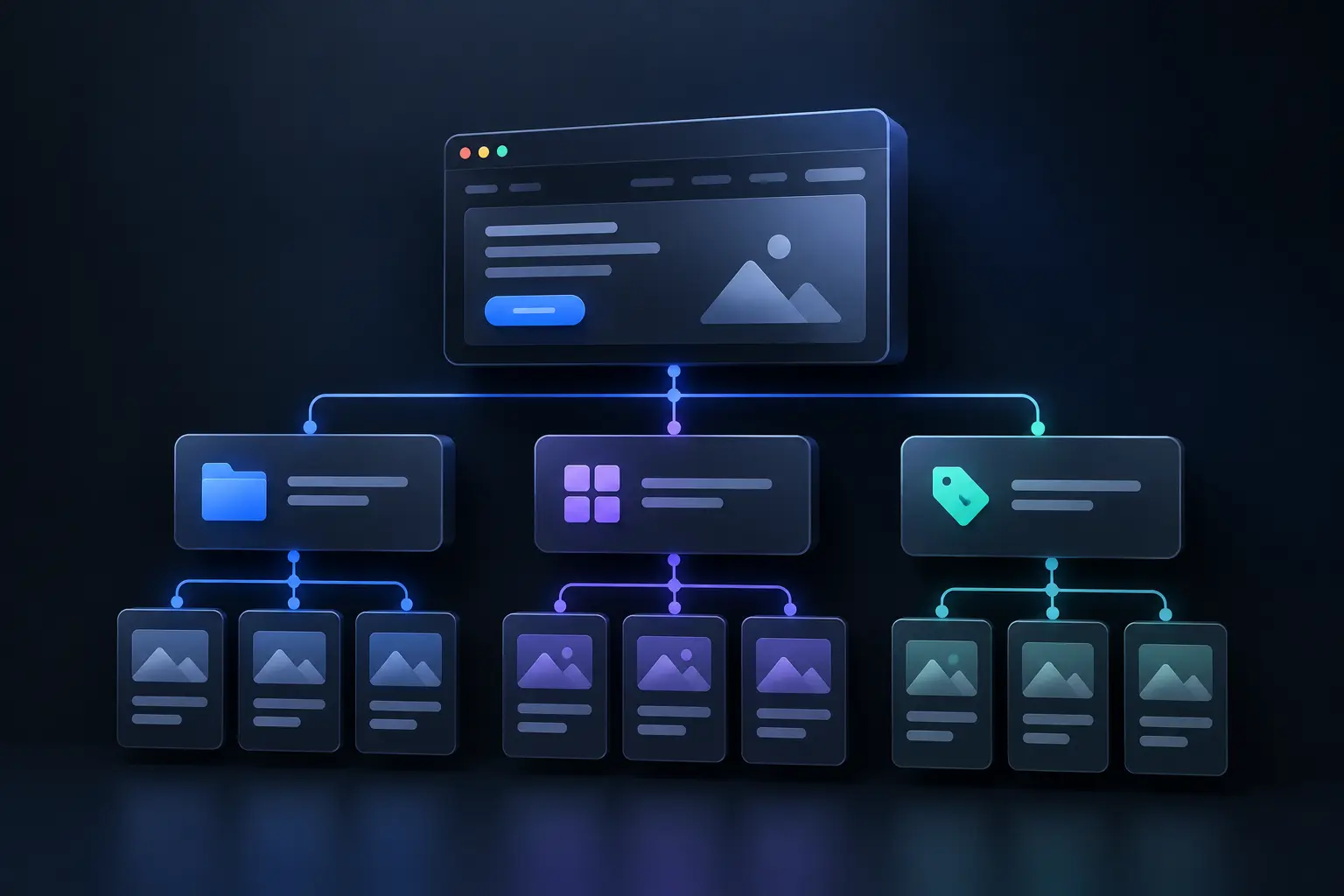
Website structure defines how a website organizes pages, content, navigation, URLs, and internal links. It shows how each page relates to another page within the site.
A clear structure starts with the homepage and connects it to major sections, categories, services, products, or resources. Those sections then connect to more specific pages through logical internal links.
Page hierarchy gives search engines and visitors a clear path through the website. Navigation helps users find important information, while internal links help crawlers discover related pages.
URL structure adds another layer of context because each address can reflect the page’s place within the site. Breadcrumbs can also show users where each page sits within that hierarchy.
Website architecture affects more than navigation. A logical structure can improve crawlability, indexing, topical relationships, and content discoverability. It can also make future expansion easier because new pages can follow an established pattern.
A strong website structure keeps important pages easy to reach and groups related information together. It therefore connects user experience, search visibility, content relationships, and long-term site scalability within one organized system.
What is website structure?
Website structure defines how a website groups pages and connects them through navigation, internal links, URLs, and content relationships. It gives users and search engines a clear map of the site.
Information architecture determines where each page belongs within that map. A typical site places broad pages near the top and specific pages beneath relevant categories.
Page hierarchy creates those relationships through levels such as homepage, category, subcategory, and detail page. This model helps visitors understand where they are and what information comes next.
Navigation turns that structure into a usable path. Menus, breadcrumbs, footer links, and contextual links help users move between related sections without losing their place.
Internal linking connects pages beyond the main menu. Those links help visitors discover related information and help search engines identify relationships between important pages.
URL structure adds another contextual signal because descriptive addresses can reflect page categories and hierarchy. A consistent pattern also helps teams manage larger sites.
Website architecture therefore describes more than visual layout. It defines the relationships between pages, content groups, navigation paths, and search discovery.
Why is website structure important?
Website structure affects how visitors find information and how search engines interpret page relationships. A logical structure reduces navigation friction because users can predict where relevant information belongs.
User experience improves when menus, categories, and page paths follow clear relationships. Visitors can then move from broad information toward specific details without unnecessary clicks or confusion.
Search engines use links and page relationships to discover and understand site content. A clear hierarchy and strong internal linking can improve crawlability and help important pages receive appropriate contextual signals.
Content management also benefits from a defined structure. Teams can identify where new pages belong, maintain consistent categories, and reduce duplicate or misplaced information.
Scalability becomes easier when the original architecture supports additional categories and pages. A planned hierarchy lets a growing site expand without forcing major navigation changes.
Conversion paths also depend on structure because users need clear routes toward actions such as purchases, enquiries, registrations, or bookings. The structure should connect informational pages with those relevant actions.
Website architecture therefore supports UX, search discovery, content governance, and future growth at the same time. Its value comes from connecting these functions within one coherent page system.
What are the types of website structures?
Website structure commonly follows four models: hierarchical, sequential, matrix, and database-driven. Each model supports different content relationships and user paths, so the site should match its structure to its primary purpose.
Hierarchical structure places the homepage at the top and creates branches through categories, subcategories, and individual pages. This model suits business websites, blogs, portfolios, directories, and many ecommerce sites because it creates clear content groups.
Sequential structure guides users through a defined order of pages or steps. This model suits tutorials, courses, onboarding flows, checkout processes, and focused landing-page journeys where each step supports the next action.
Matrix structure connects pages through multiple relationships rather than one fixed hierarchy. Users can move between related topics through links, search, filters, or other paths. This model suits information-rich sites with many cross-topic relationships.
Database-driven structure uses structured data and templates to create or organize large sets of pages. This model suits marketplaces, large ecommerce catalogs, forums, directories, and platforms with dynamic content.
Hybrid structure combines models when one pattern cannot support every site function. A business site might use hierarchy for core pages, sequential paths for forms, and database templates for large content collections.
How do you map a website structure?
Website structure mapping starts with the pages, categories, and user paths that a website needs. A clear map shows how those elements connect before design or development begins.
Website goals define the first layer of the map. Identify the site's primary purpose, target users, key actions, and major content groups before creating page relationships.
Content inventory identifies existing pages, required pages, duplicate topics, and missing sections. Group related content so each page has a clear place within the hierarchy.
Page hierarchy then connects broad sections with more specific pages. Place the homepage at the top, add primary sections below it, then add relevant child pages.
Navigation paths show how users move between those pages. Mark important internal links, breadcrumbs, and cross-links that support discovery beyond the main menu.
Visual sitemap turns these relationships into a diagram that teams can review. The diagram should show parent-child relationships without displaying every minor link.
SEO and UX review tests the proposed structure before implementation. SEO checks crawlability and page relationships, while UX checks findability and task paths.
Development review confirms that URLs, templates, CMS rules, and technical constraints support the planned architecture. This final check reduces structural changes after development starts.
What is a website structure diagram?
A website structure diagram is a visual representation of how pages connect within a website. It shows hierarchy, navigation paths, content groups, and important relationships in a format that teams can review quickly.
Homepage hierarchy usually appears at the top of the diagram because it acts as the site's primary root. Main sections branch from it and create the first level of organization.
Child pages appear beneath their relevant parent sections. This placement shows which pages belong together and helps teams identify missing, duplicated, or misplaced content.
Navigation paths show how users reach important pages through menus and links. A useful diagram can also mark meaningful cross-links that connect related sections.
Dynamic templates need separate notation on larger websites. A diagram can represent product, article, location, or directory templates without drawing every generated URL.
SEO review uses the diagram to inspect crawl paths, page depth, internal relationships, and important content access. UX review uses it to assess findability and task progression.
Development teams can also use the diagram to understand routes, templates, and content relationships before implementation. The diagram therefore acts as a shared planning model across SEO, UX, content, and development.
A website structure diagram differs from an XML sitemap. The diagram helps people plan and review architecture, while an XML sitemap provides URLs for search engine discovery.
How does website structure improve user experience?
Website structure improves user experience by making content easier to find, understand, and access. Clear relationships reduce uncertainty because users can predict where relevant information should appear.
Navigation clarity gives users recognizable paths through major sections. Descriptive menu labels help visitors understand what each destination contains before they select it.
Content grouping keeps related information together. Users can move from broad topics to specific details without repeatedly returning to the homepage or searching for missing context.
Page hierarchy also reduces cognitive effort. A predictable parent-child relationship helps visitors understand where they are and what related information they can explore next.
Breadcrumbs reinforce that hierarchy on deeper pages. They show the current location and give users a direct route back to broader sections.
Internal links create additional paths between related pages. Contextual links can guide users from an explanation toward supporting details, services, products, or relevant resources.
Mobile navigation becomes especially important on smaller screens. Responsive menus, clear labels, accessible controls, and concise page paths help users complete tasks with less friction.
Conversion paths benefit from the same clarity. Users can reach forms, purchases, bookings, or contact pages when the structure connects informational content with relevant actions.
Website structure therefore supports findability, comprehension, navigation, and task completion together. A strong architecture helps users reach useful information without forcing them to understand how the website was built.
How does website structure affect SEO?
Website structure affects SEO through page discovery, internal links, topical relationships, and crawl paths. Google uses links to discover pages and understand how those pages relate.
Internal links connect important pages with relevant sections across the website. They also help Google assess the relative importance of pages within the site.
Page hierarchy gives search engines a clearer path through categories, subcategories, services, and supporting content. A logical hierarchy also helps users reach relevant pages with fewer uncertain steps.
Crawl depth shows how many internal links separate a page from the homepage. Important pages should usually stay within two or three clicks. This target supports discovery without forcing every page into the top navigation.
Topical structure also affects how Google interprets relationships between related pages. A central topic page can connect to focused supporting pages through relevant internal links.
URL structure adds another layer of clarity when paths follow logical patterns. Google recommends crawlable URLs and standard links that let its systems discover site content.
A strong structure therefore supports discovery, page relationships, internal authority flow, and efficient site access. Poor structure can hide important pages, create orphan URLs, and weaken connections between related content.
How many levels deep should a website structure be?
Website structure should stay as shallow as the content hierarchy allows. Most business websites can keep important pages within two or three clicks of the homepage. This is a practical target, not a fixed Google requirement.
Click depth measures the number of links between the homepage and a specific page. The homepage has depth zero. A page linked directly from it has depth one. A service page under a service hub can have depth two.
Deeper levels can support genuine categories and subcategories. Large ecommerce websites, documentation systems, and resource libraries may need additional hierarchy layers.
The main risk appears when important pages sit deep without strong internal links. Users need more steps to reach them. Search engines also need more links to reach those URLs. Google uses page link relationships to understand site structure and relative page importance.
A hub-and-spoke structure can reduce unnecessary depth. A central hub links to focused pages, while those pages connect to related content.
The main website structure levels are listed below.
Depth 0: The homepage acts as the primary entry point and connects visitors to major site sections.
Depth 1: Main sections organize broad business areas, categories, services, or content groups.
Depth 2: Service pages, topic hubs, product categories, and key landing pages address defined user needs.
Depth 3: Detailed services, products, resources, and focused articles provide narrower information within those groups.
Depth 4+: Additional levels should represent a genuine hierarchy rather than compensate for weak navigation or internal linking.
How do you identify website structure issues?
Website structure issues appear when the planned hierarchy differs from the actual connections between pages. A structural audit should examine page depth, internal links, navigation, URLs, and content relationships together.
A crawl can expose structural problems that normal browsing may not reveal. It can show which pages lack internal links, which paths create excessive depth, and which URLs disconnect from the main hierarchy.
The main website structure issues are listed below.
Crawl depth: Find important pages that require several clicks from the homepage. Check whether relevant hubs can create shorter paths.
Orphan pages: Find URLs with no incoming internal links. Add relevant links when those pages deserve discovery.
Broken internal links: Find links that return errors or point to removed URLs. Replace them with relevant working destinations.
Weak anchor text: Find vague labels such as “click here” or “read more.” Replace them with text that describes the destination.
Missing topic hubs: Find related pages without a clear parent section. Create a hub when the content needs a central organizing page.
Inconsistent URLs: Compare URL patterns across related page types. Fix patterns that conflict with the intended hierarchy.
Navigation gaps: Check whether menus, breadcrumbs, and contextual links connect important pages through logical paths.
Discovery gaps: Compare crawl data with internal links, XML sitemaps, and Search Console data. Look for important URLs that lack strong discovery paths.
How do you improve internal linking structure?
Internal linking structure improves when relevant pages connect through clear, crawlable paths. Google uses links to discover pages and understand relationships between site content.
A strong internal link connects a source page with a useful destination. The surrounding content should also explain why that destination matters.
Descriptive anchor text gives users and Google more context about the linked page. Google recommends concise, relevant anchor text instead of generic phrases such as “click here.”
Important pages also need links from relevant pages across the website. Google states that every page you care about should have a link from another page.
The main ways to improve internal linking structure are listed below.
Link related pages: Connect pages that share a clear topic, service, product, or user task.
Prioritize important pages: Add relevant internal links to core services, categories, products, and cornerstone content.
Use descriptive anchors: Write anchor text that tells users what they will find on the destination page.
Fix orphan pages: Add relevant internal links to valuable pages that have no incoming internal links.
Reduce excessive depth: Add links from relevant hubs when important pages sit several clicks from the homepage.
Connect topic clusters: Link hub pages with focused supporting pages to clarify relationships between related content.
Review old content: Add relevant links from established pages to newer resources when the topics share a clear connection.
Keep links crawlable: Use standard HTML links with an href attribute so Google can crawl the destination.
What is URL structure?
URL structure is the way a website organizes page addresses into readable and logical paths. A clear URL can help users understand a page before they open it. Google recommends simple, descriptive URLs that use readable words instead of long identifiers.
A URL can reflect the site's content hierarchy through meaningful paths. For example, /services/web-design/ shows a clearer relationship than a URL with unrelated numbers or parameters.
URL structure also supports consistent site organization. Related pages can use related paths when those paths accurately represent their content relationships.
Google recommends using words that match the audience's language. It also recommends standard URL encoding and valid URL structures.
Simple URLs should describe the destination without unnecessary complexity. Shorter URLs can improve readability, but length alone does not determine whether a URL works well.
A good URL structure should also remain stable after publication. Unnecessary URL changes can create redirects, broken links, and outdated references across the website.
Site owners should therefore design URL patterns before they create large groups of pages. A consistent pattern makes future categories, services, products, and resources easier to organize.
URL structure should support both human understanding and technical crawlability. It should reflect the page's subject without forcing keywords or adding unnecessary hierarchy.
What are XML and HTML sitemaps?
XML and HTML sitemaps serve different purposes within website structure. An XML sitemap helps search engines discover URLs, while an HTML sitemap helps visitors navigate site content.
The main differences between XML and HTML sitemaps are listed below.
Google states that a sitemap helps search engines discover URLs but does not guarantee crawling or indexing. Proper internal linking remains important because Google can discover most well-linked pages without a sitemap.
An XML sitemap therefore supports the crawler side of website structure. An HTML sitemap supports the visitor side. Both can complement a clear navigation and internal linking system.
What are the key components of website structure?
Website structure combines the hierarchy, navigation, links, and page relationships that determine how visitors and search engines move through a site. Information architecture defines how content groups, labels, and relationships fit together.
A clear hierarchy places broad sections above specific pages. Navigation then exposes important paths through menus, breadcrumbs, and other interface links. Internal links connect related pages beyond the primary navigation.
URLs can reinforce the hierarchy when their paths reflect meaningful content relationships. Sitemaps provide additional discovery paths, while breadcrumbs show a page's position within the site's hierarchy.
The main components of website structure are listed below.
Website hierarchy: A parent-child hierarchy groups broad sections, categories, subcategories, and individual pages into logical levels.
Navigation: Menus connect visitors to important sections through clear labels and predictable paths. Consistent navigation also supports accessibility.
Categories: Categories group related pages around a shared subject, service, product type, or content theme.
Internal links: Contextual links connect related pages and help users discover supporting information across the site.
URL structure: Descriptive URL paths show where pages fit within the site's content organization.
Breadcrumbs: Breadcrumb trails show the current page's position within the wider hierarchy and provide another navigation path.
Sitemaps: Visual sitemaps help teams plan page relationships, while XML sitemaps provide search engines with lists of site URLs.
Footer links: Footer navigation provides access to supporting pages such as contact, policies, accessibility, and important site resources.
What is the homepage?
The homepage is the main entry page of a website. It introduces the site's purpose, highlights important sections, and directs visitors toward key pages. In website design, it acts as the central hub for site navigation.
What is a navigation menu?
A navigation menu is a system of links that helps visitors move between website sections. It connects users with important pages through clear labels and organized paths. In website design, it provides the primary route through the site's hierarchy.
What are categories and subcategories?
Categories and subcategories are groups that organize related website pages into broader and narrower topics. Categories define major content areas, while subcategories create deeper levels. In website design, this hierarchy helps users find related information.
What are content pages?
Content pages are individual website pages that provide specific information about a topic, service, product, or resource. Each page serves a defined user need. In website design, these pages occupy specific positions within the site's hierarchy.
What are internal links?
Internal links are links that connect one page to another page within the same website. They create relationships between related content and provide additional navigation paths. In website design, these links help users discover relevant pages.
What are breadcrumbs?
Breadcrumbs are navigation links that show a page's position within a website hierarchy. They connect the current page with its higher-level sections. In website design, breadcrumbs help users understand their location and move toward broader sections.
.svg)
.svg)
.svg)
.svg)